
ÖTZI

ÖTZI

ÖTZI

Case study

About ÖTZI

About ÖTZI

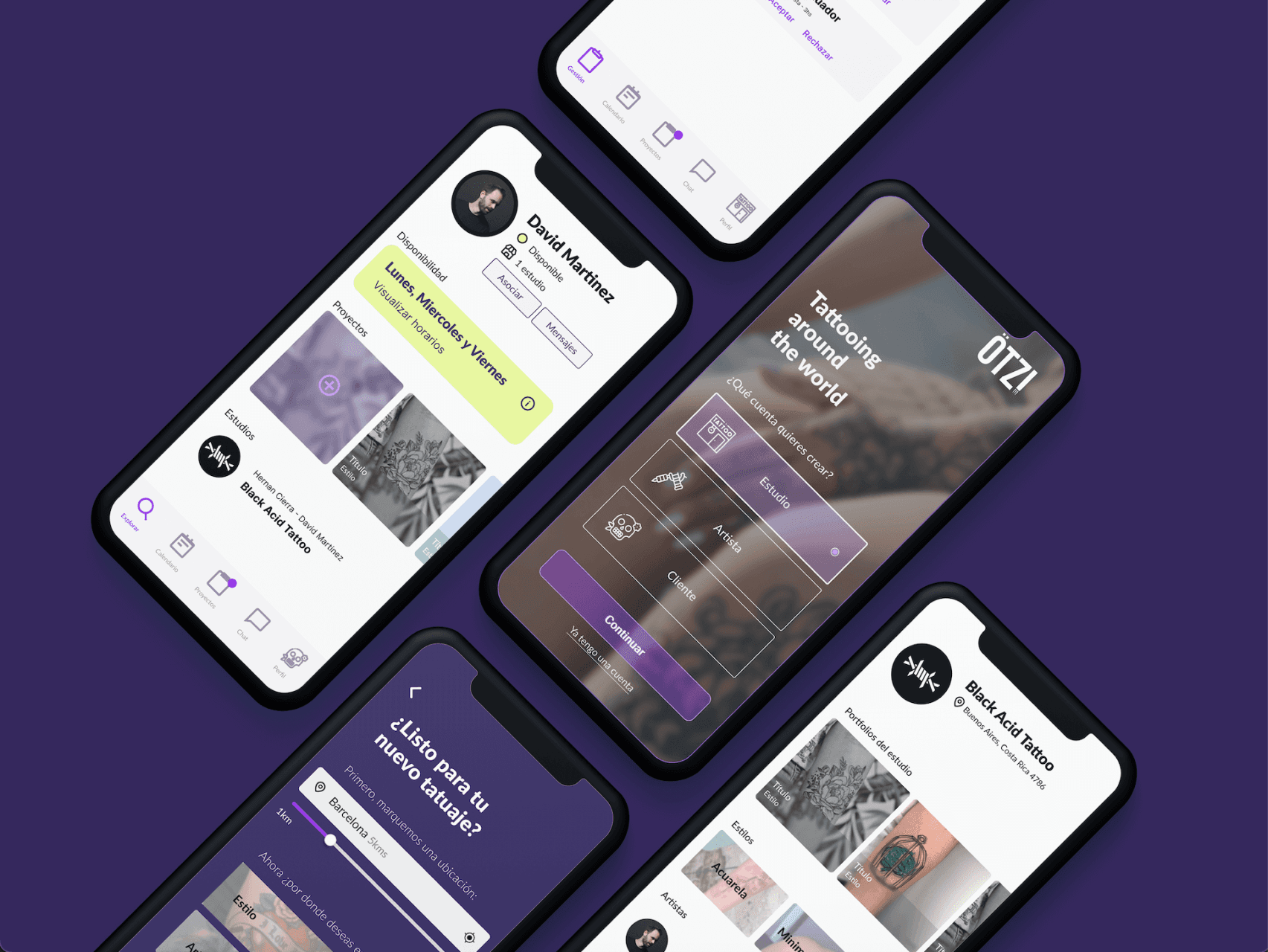
Ötzi is a mobile application for registering and requesting tattoo appointments, contemplating its use in: Tattoo studios (“studio”), tattoo artists who are part of them (“artists”) and customer users of this product (“customers”). .It has Asynchronous operation (with and without internet connection, data recording).
Project goals

Project goals

“Ötzi is a new way to plan your tattoos worldwide!”
ÖTZI seeks to be a complete product, with clear organization and accessible navigation to streamline registration, management and budget processes for tattoo sessions, taking into account the needs of all the profiles involved.

“Ötzi is a new way to plan your tattoos worldwide!”
ÖTZI seeks to be a complete product, with clear organization and accessible navigation to streamline registration, management and budget processes for tattoo sessions, taking into account the needs of all the profiles involved.

The construction

The construction

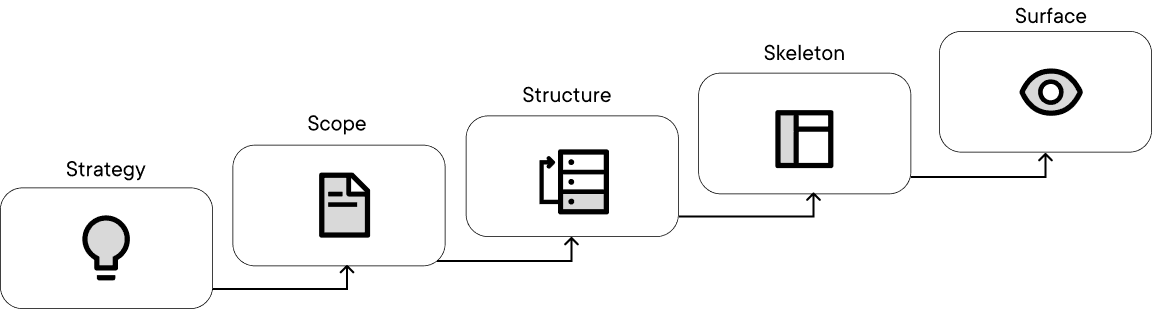
For this project we used a metodology related to Garret’s design process specially in regards of strategy, scope and structure as initial steps going into skeleton and surface of the project as later instances, each with their needed deliverables paying close attention to iteration and evaluation of both usability and business needs.

For this project we used a metodology related to Garret’s design process specially in regards of strategy, scope and structure as initial steps going into skeleton and surface of the project as later instances, each with their needed deliverables paying close attention to iteration and evaluation of both usability and business needs.

The process

STRATEGY

  • User Journey Map - Pain Points

  • Benchmarking - Comparable analysis.

SCOPE

  • MVP

  • Userflow / User Stories

STRUCTURE

  • CardSorting

  • Tree-testing

  • Information Architecture

SKELETON

  • Low-fi Wireframe

  • Sketching process

SURFACE

  • Identity / MoodBoard

  • Color System, Iconography and visual hierarchy

  • Mockup screens

The process

STRATEGY

  • User Journey Map - Pain Points

  • Benchmarking - Comparable analysis.

SCOPE

  • MVP

  • Userflow / User Stories

STRUCTURE

  • CardSorting

  • Tree-testing

  • Information Architecture

SKELETON

  • Low-fi Wireframe

  • Sketching process

SURFACE

  • Identity / MoodBoard

  • Color System, Iconography and visual hierarchy

  • Mockup screens

Strategy - Research

Strategy - Research

Strategy - Research

Being a yet unpublished project at the time the project idea came to us, the first step was to know where in the market it belongs to: who’s the user? is there any other tool like this one? If there is, what can we learn from it?

To start solving this questions the first step was performing a benkmark analysis and research about any other product solving the same needs.

Tattodo
Main pain points:

  • Difficulty to create artist profile, major focus on client’s account.

  • “Global” application without global capacities or tools (like location or language)

  • No ‘spanish’ option, the ‘spanish’ version have just some sections translated.

Tattodo
Main pain points:

  • Difficulty to create artist profile, major focus on client’s account.

  • “Global” application without global capacities or tools (like location or language)

  • No ‘spanish’ option, the ‘spanish’ version have just some sections translated.

With a known base to start with it’s time to select the involved users and profiles: who is our user? do we have different types of users? whats the main difference between them?

STUDIOS

Administration and registration of projects and artists.

  • Needs a way to organize both artists and clients.

  • Normally uses a paper planner or an spreadsheet to organize schedule and payment.

  • It’s hard and tedious to organize and modify schedules in the current system.

  • Mainly personal and telephonic comunication.

ARTISTS

Art portfolio, easy contracts and appointment organization

  • Depends on social media to show their work

  • Manually organize their schedule alongside the studio.

  • It’s hard and tedious to organize and modify schedules in the current system.

  • Needs to unify their work and present a complete portfolio.

CLIENTS

Art portfolio, easy contracts and appointment organization

  • Long a complex artist search since there’s a multitude of different spaces -ie. social media, behance, personal websites- and it’s hard to keep up with all of them.

  • Depends on their own reminders or an external space to be reminded of dates and appointments.

  • Mainly personal and telephonic comunication.

SCOPE - MVP construction

SCOPE - MVP construction

SCOPE - MVP construction

In this step we definey the scope of the product, creating an MVP of most relevant and needed features. This will then be passed to every other part of the group, or in this case created alognside with them.


MVP

  • Dedicated profile highlighting the operations related with each user

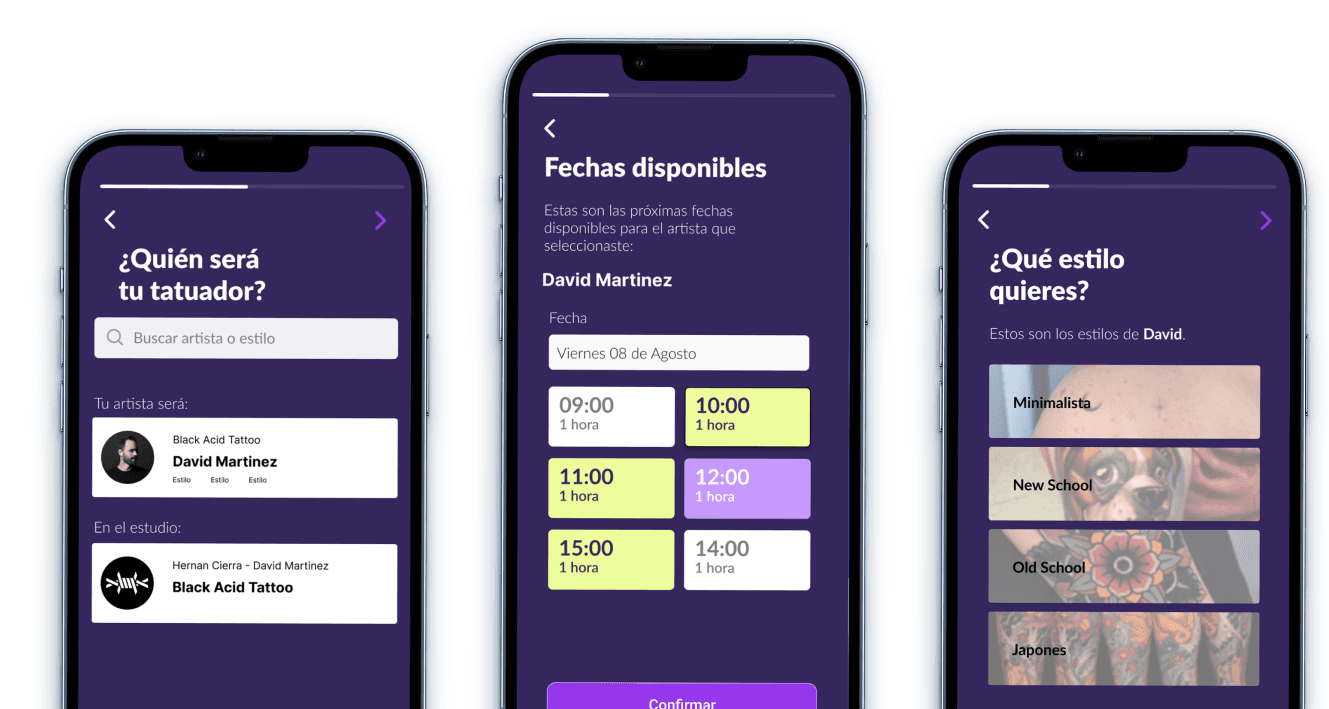
    • Clients: Create a request with a tattoo artist by choosing an style, an existing project or an artist that they like.

    • Artists: Create a portfolio of projects, review -an accept or decline- request and asociate with studios.

    • Studios: Create a studio account with related artists, events and schedule.

  • Step-by-step organization of tattoo requests, with multiple ways to approach the project.

  • Shared calendar an schedule between clients and artists and between artists and studios to facilitate appointments.

  • Easy to access portfolio shared between artists and clients.

  • Geolocalization to find artists and studios globally

  • Create events and open projects to be picked by clients.

Technical aspects to keep in mind:

Technical aspects to keep in mind:

Technical aspects to keep in mind:

  • Hybrid mobile application: made for both Android (Material Design) and iOS (Human Interface) devices, creating an unique design system that considers both sets of design patterns.

  • Visibility and contrast: Being an application with a heavy focus in the user’s content in all of the posible profiles it’s fundamental to assure the visibility and findability of all elements and aspects no matter what the content is.

  • Legality and consent: Being a tattoo related application the user guidelines and legal regulations are some of the main aspects to keep in mind while creating an account.
IDEATE - Navigation and hierarchy

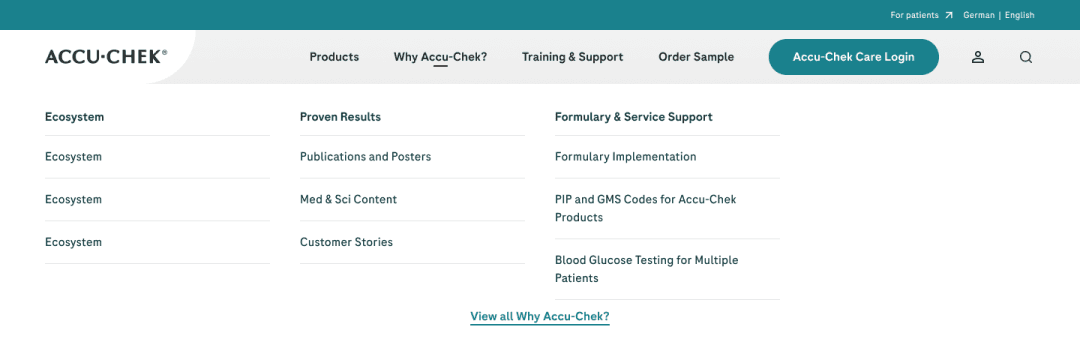
To mark the navigation hierarchies, in this case, a 'mega menu' was created where the necessary categories can be easily accessed. This format provides the ability to incorporate or remove sections depending on the needs of each site, taking into account that Roche's offers or properties in different regions may vary, with products enabled or products not available.


Information Architecture

STRUCTURE - Navigation and hierarchy

STRUCTURE - Navigation and hierarchy

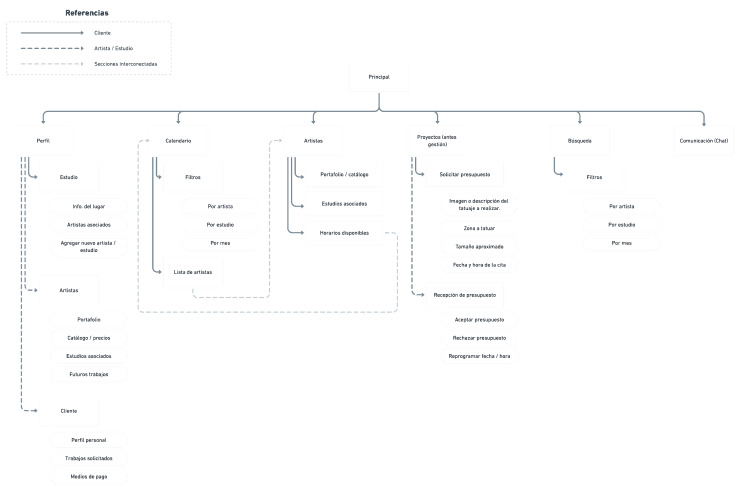
With the defined profiles and the MVP outlined is time to create the proper app structure, contemplating the relevance of each section, how they relate with each other and, at the same time, how they work independently.

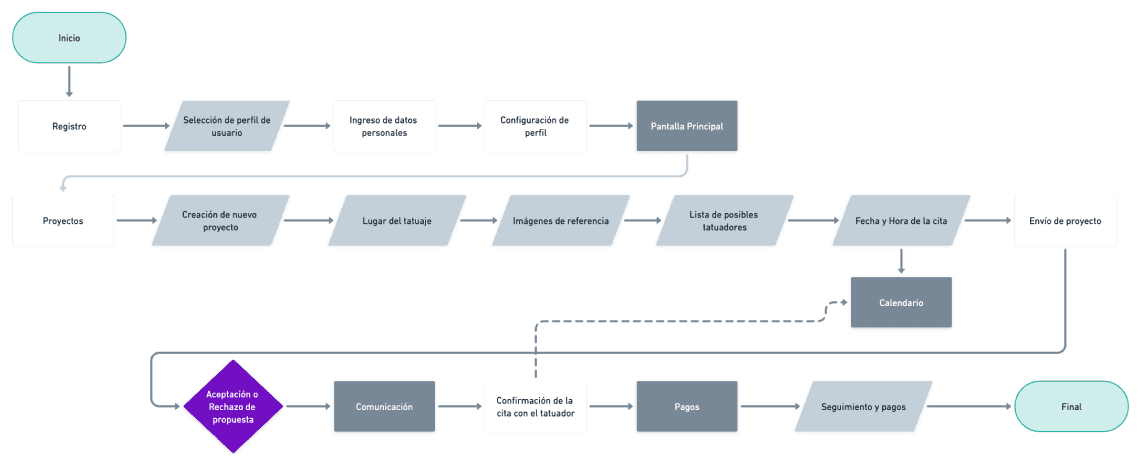
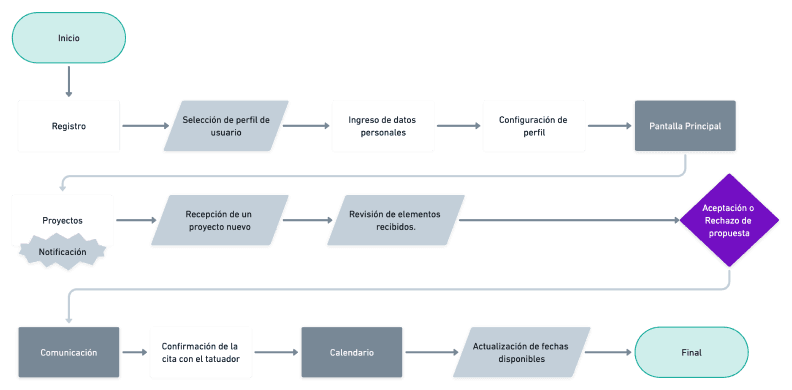
There’s two primary actions taken in this step: an information architecture diagram -validated by a CartSorting study- and a userflow showing all the steps the user makes in order to finish each main task.


Information Architecture


For the demo version of the app we focused in the client as the main user, creating an estructure that connects all profiles between eachother.

This diagram was first created and shared in a Figjam file to stablish potential iterations and revisions before passing this information to whimsical for a final sharable diagram.

This is also related to the results found in the analysis of the cartsorting process conducted in this step.

To mark the navigation hierarchies, in this case, a 'mega menu' was created where the necessary categories can be easily accessed. This format provides the ability to incorporate or remove sections depending on the needs of each site, taking into account that Roche's offers or properties in different regions may vary, with products enabled or products not available.


Userflow

Userflow

With the defined profiles and the MVP outlined is time to create the proper app structure, contemplating the relevance of each section, how they relate with each other and, at the same time, how they work independently.
As said before, the second step taken is the creation of a userflow, still considering the ‘client’ as the main user type.


Client


Artist


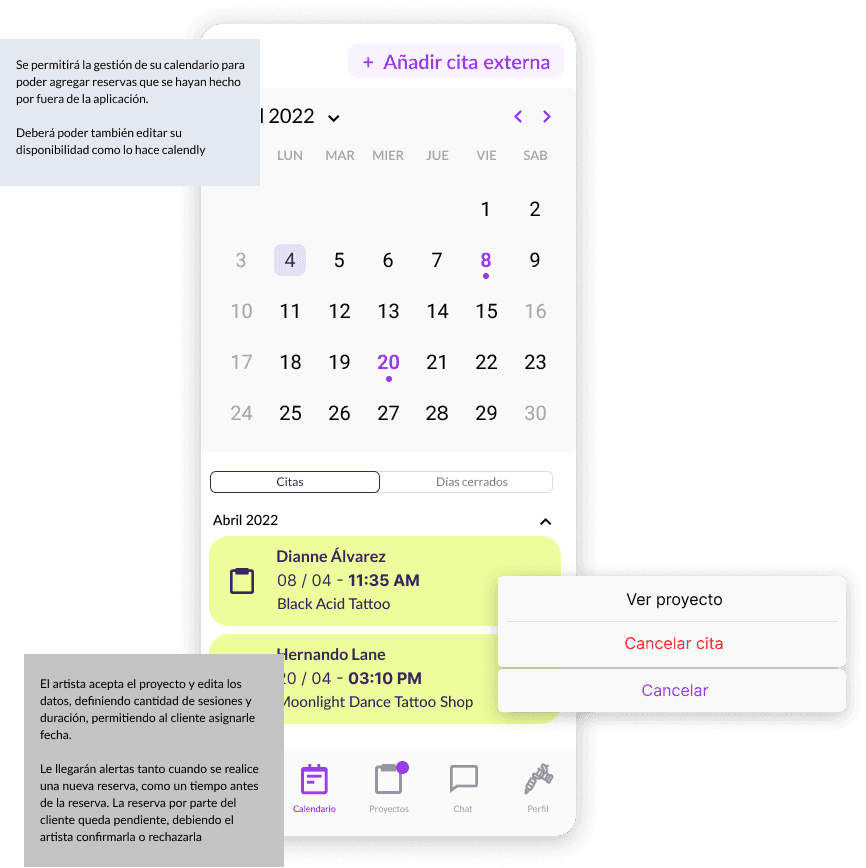
The side of the artist reflects the created requests and also the open projects and their related sections, keeping close track of the available hours and duration of the appointments.

Skeleton - Low-fi Wireframes

Skeleton - Low-fi Wireframes

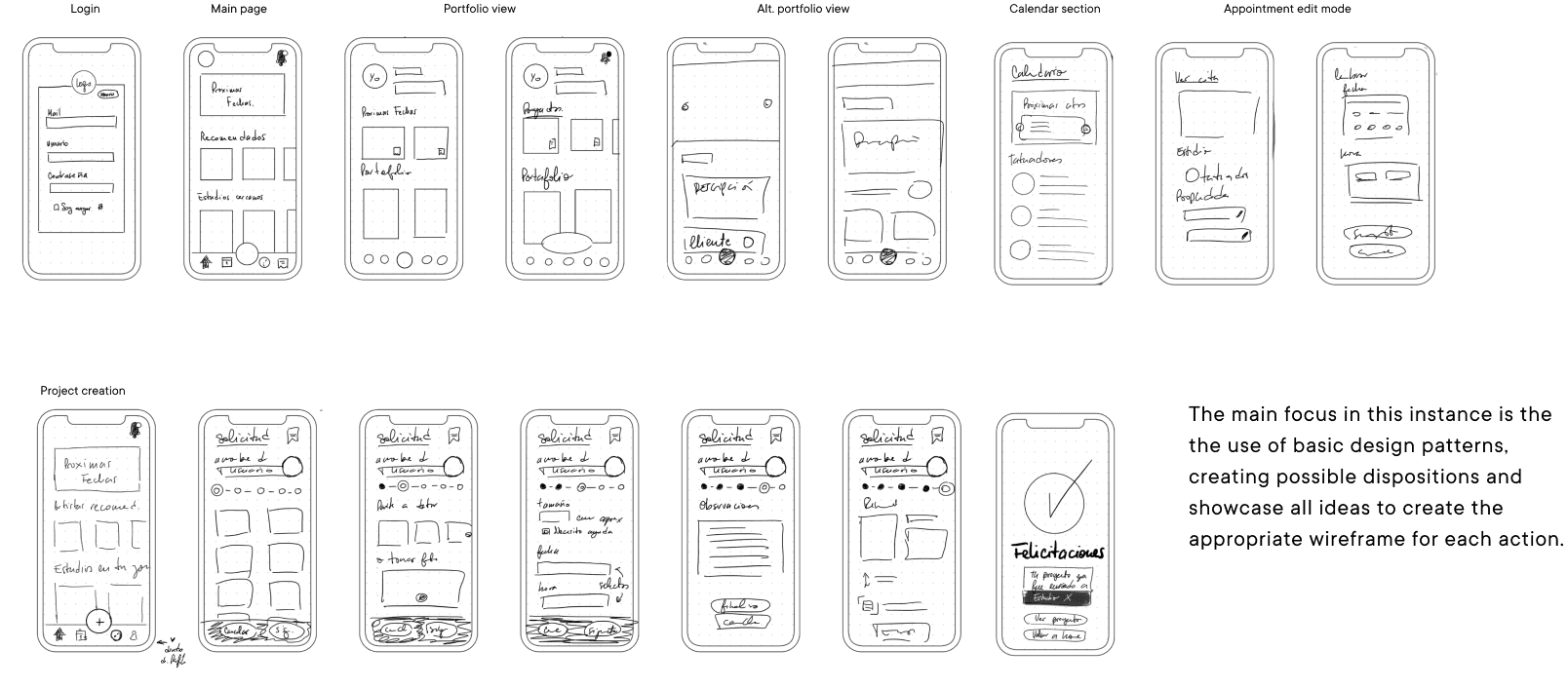
The skeleton phase show us the base for the mockup design, allowing us to create basic wireframes with minimal resources and display the main features and connections without worrying about the output at the time. This is similar to the ideation process in the original Design Thinking methodology.

In this case the ideation process was made internally and concealed into (digital) paper wireframes.

Skeleton - Low-fi Wireframes

The skeleton phase show us the base for the mockup design, allowing us to create basic wireframes with minimal resources and display the main features and connections without worrying about the output at the time. This is similar to the ideation process in the original Design Thinking methodology.

In this case the ideation process was made internally and concealed into (digital) paper wireframes.

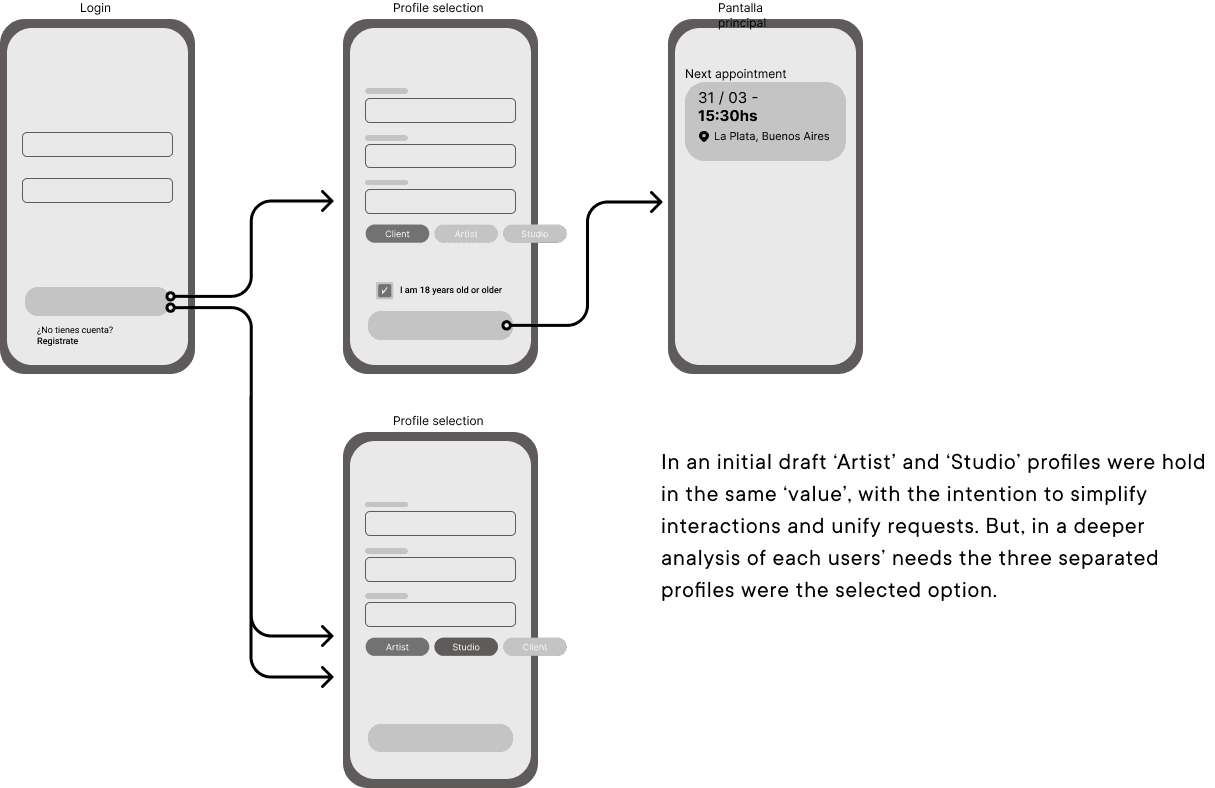
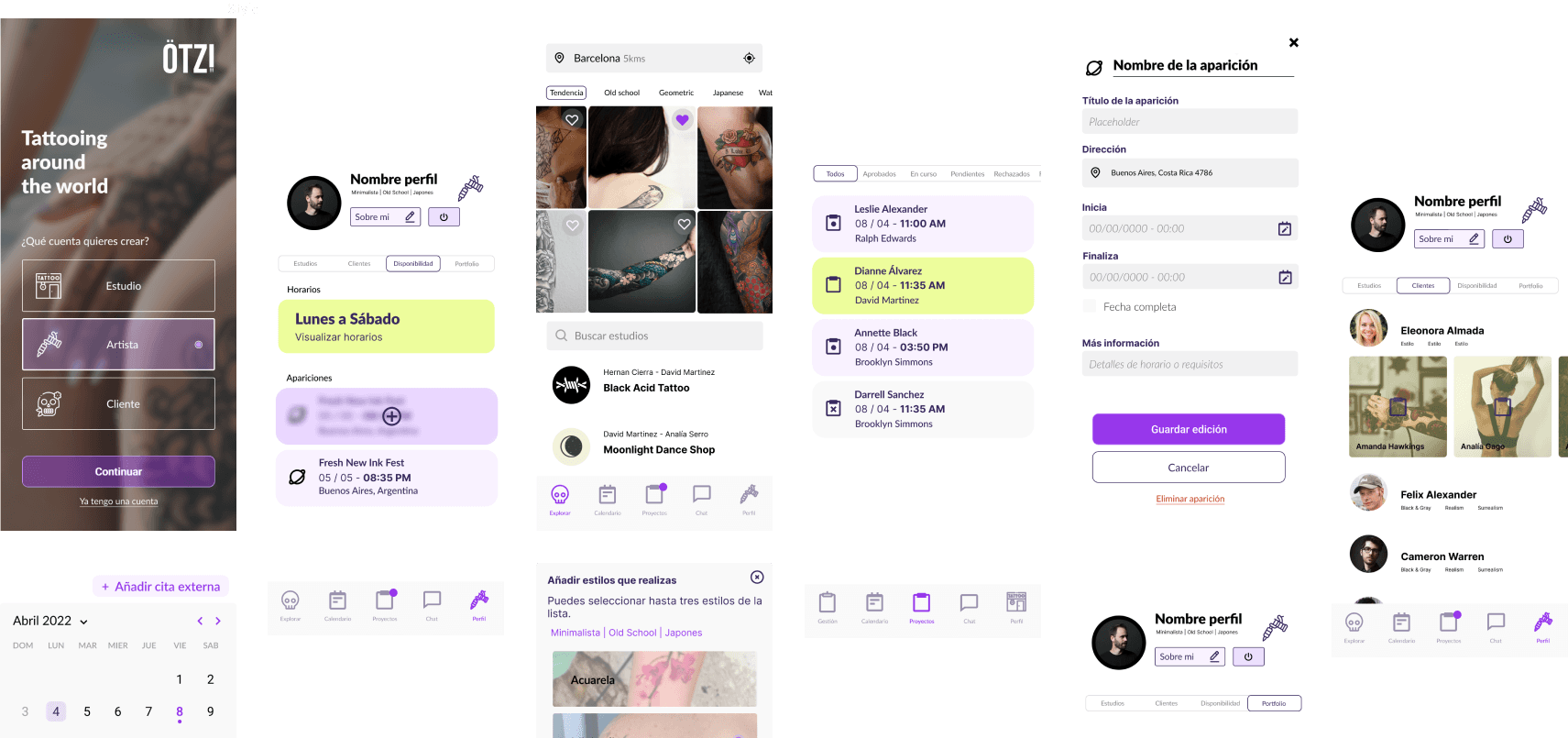
In the same step, and keeping in mind the needed interactions we traced a wireflow. A wireflow is a visual representation that combines elements of a wireframe and a user flow to illustrate the navigation and interaction within a digital interface.

In the same step, and keeping in mind the needed interactions we traced a wireflow. A wireflow is a visual representation that combines elements of a wireframe and a user flow to illustrate the navigation and interaction within a digital interface.

Surface - Hi-fi wireframes

Surface - Hi-fi wireframes

The wireframes and prototypes created on the skeleton plane will be used on the surface plane – the top and most concrete plane – to create the final pages for the product.

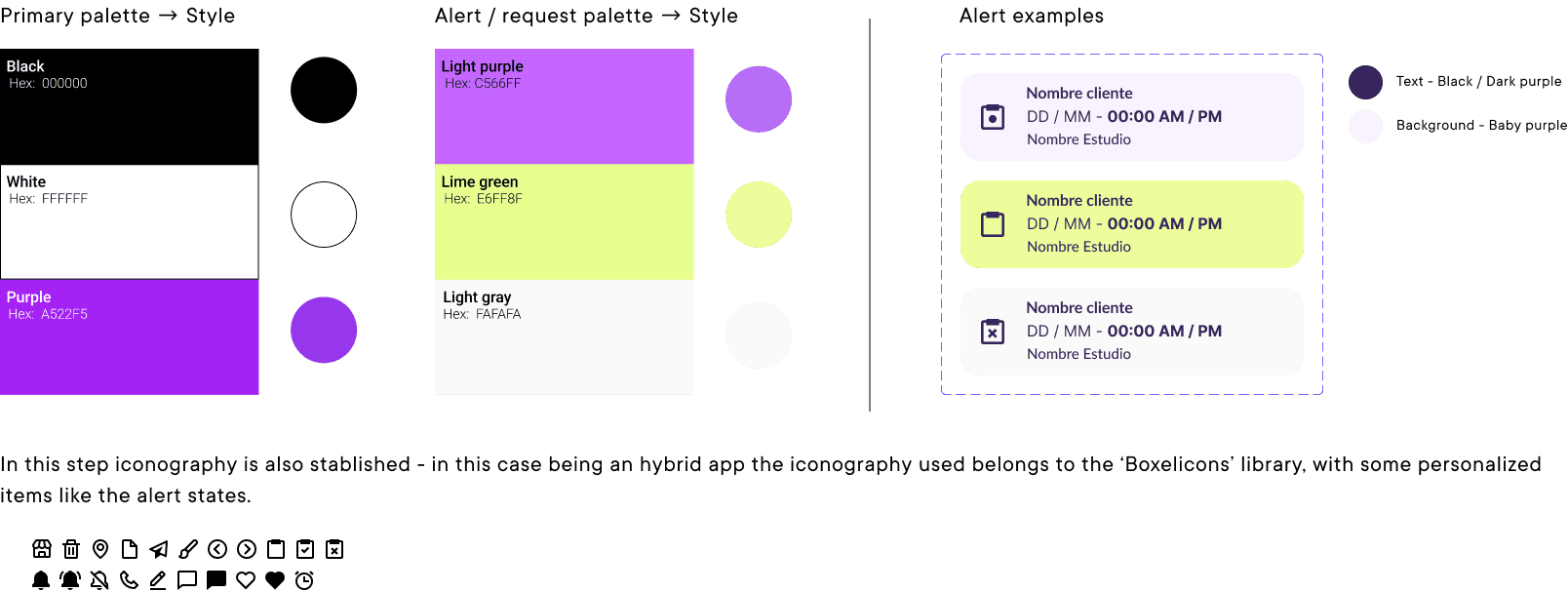
First, we create a color palette and identity - this was a collaboration with the marketing and design departments, where the naming of the product and co color palette formed and was forwarded to the UX/UI section.

Each color on the palette was then divided into styles, to be applied in the design components

The wireframes and prototypes created on the skeleton plane will be used on the surface plane – the top and most concrete plane – to create the final pages for the product.

First, we create a color palette and identity - this was a collaboration with the marketing and design departments, where the naming of the product and co color palette formed and was forwarded to the UX/UI section.

Each color on the palette was then divided into styles, to be applied in the design components

For this passage, in addition to the corresponding documentation, several weekly meetings were taken into account to establish objectives, possible improvements and exchange spaces that allowed us to understand the specific needs of each section of the product.

Separated in sections and sprints, each implementation consisted in a review session with both teams, application of changes and iterations and a short round of user testings.

The conclusion

The conclusion

The conclusion

The construction of an MVP establishes specific needs to be covered in the shortest period of time possible and with the resources available, which allows in the future to think of new alternatives to improve the same product both in processes and features.

In this same light is important to reflect in what has been done and what new steps can be added in tha new iteration, showing the digital product is always evolving and changing.

In our experience, some later steps can be:

Create a better alert system

Apply accelerators and simplify interactions

Adoption of new tools to help studios and artists

Do you want to create a complete and innovative experience?

We're here to help you achieve it

Barcelona - New York - Buenos Aires

Do you want to create a complete and innovative experience?

Do you want to create a complete and innovative experience?

We're here to help you achieve it

We're here to help you achieve it

Barcelona - New York - Buenos Aires

Barcelona - New York - Buenos Aires